![Logo_DPW_Internal-1.png]](https://internal.dermapenworld.com/hs-fs/hubfs/Logo_DPW_Internal-1.png?height=1410&name=Logo_DPW_Internal-1.png)
n8n is continually being backed up and can be restored at any time or generate a new vm instance if needed for testing (currently we retain the last 30 days + multiple current intra daily snapshots)
To do so go to Azure portal link under virtual machines in PAYG subscription

select a point to restore VM or File (typically we would do VM) and then select where you would like to restore to

select to create new or replace ( creating new will mean you will need to reassign IP , replacing is an overide of existing if you needed to roll back)
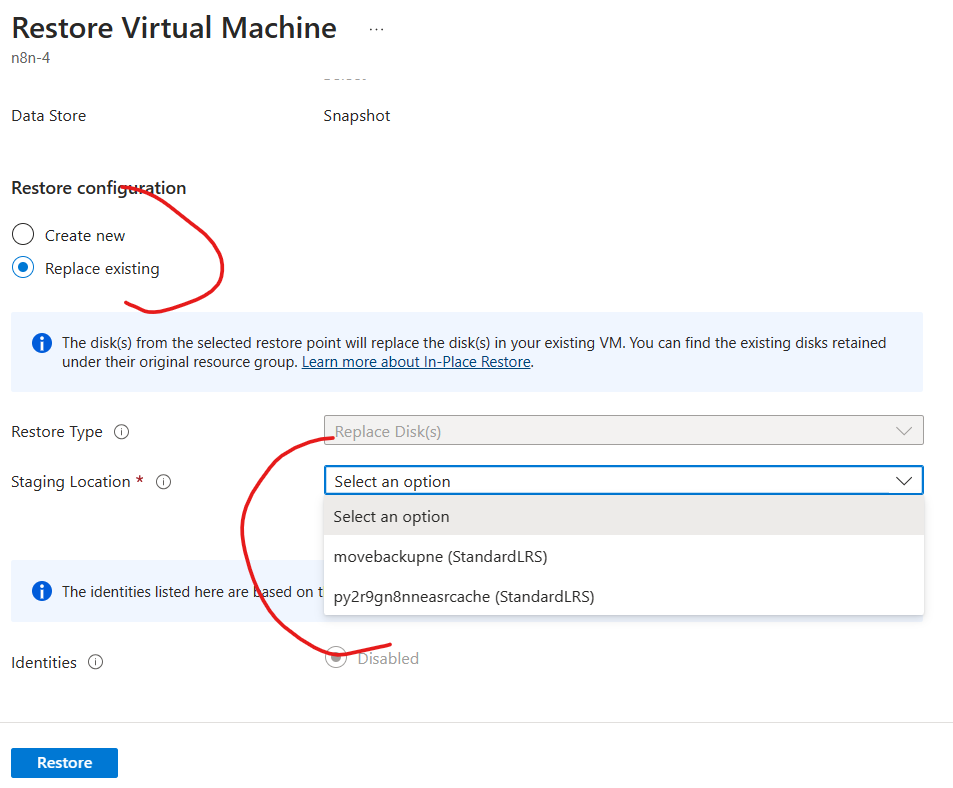
staging location is where it will temp copy before overriding the VM
the remaining steps are straight forward. (I'd advise to go through guides or ask copilot for guidance)
If you Replace , it should be quite smooth as long as the backup was good .
Create new needs some config on the new VM and maybe DNS assignments if you want to use for testing
Note network interface of the VM is where the Public IP is assigned , if you create a new VM from Backup you will need to move the ip or assign a new one depending on what you want to achieve
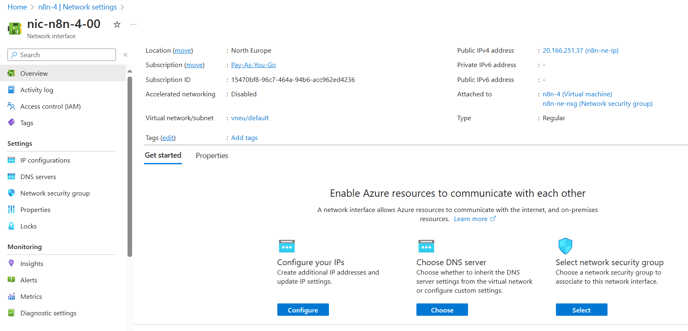
as you can see below we have n8ntest 2nd ip that can be assigned if needed
